Ergonomic workstation checklist: occupational-health-compliant in 6 steps
A well-considered ergonomic set-up prevents complaints and increases focus.
The Back Pain of Working Uninformed: Stop the Expense
Many employees suffer from neck, shoulder or back complaints because of their work. That is not 'bad luck', but often a direct consequence of a non-ergonomic set-up. The impact on productivity and absence is considerable.
It is time to look beyond the standard office chair and monitor. A correctly set up ergonomic workstation is the most effective investment in the health and focus of your team. Whether you manage a growing office or run a flexible start-up, this complete checklist helps you make your office occupational-health-compliant.
What is an Ergonomic Workstation (NPR 1813:2025 Update)
An ergonomic workstation is an environment designed to match the physical and mental capacities of people as closely as possible, so that health complaints are prevented and productivity is maximised.
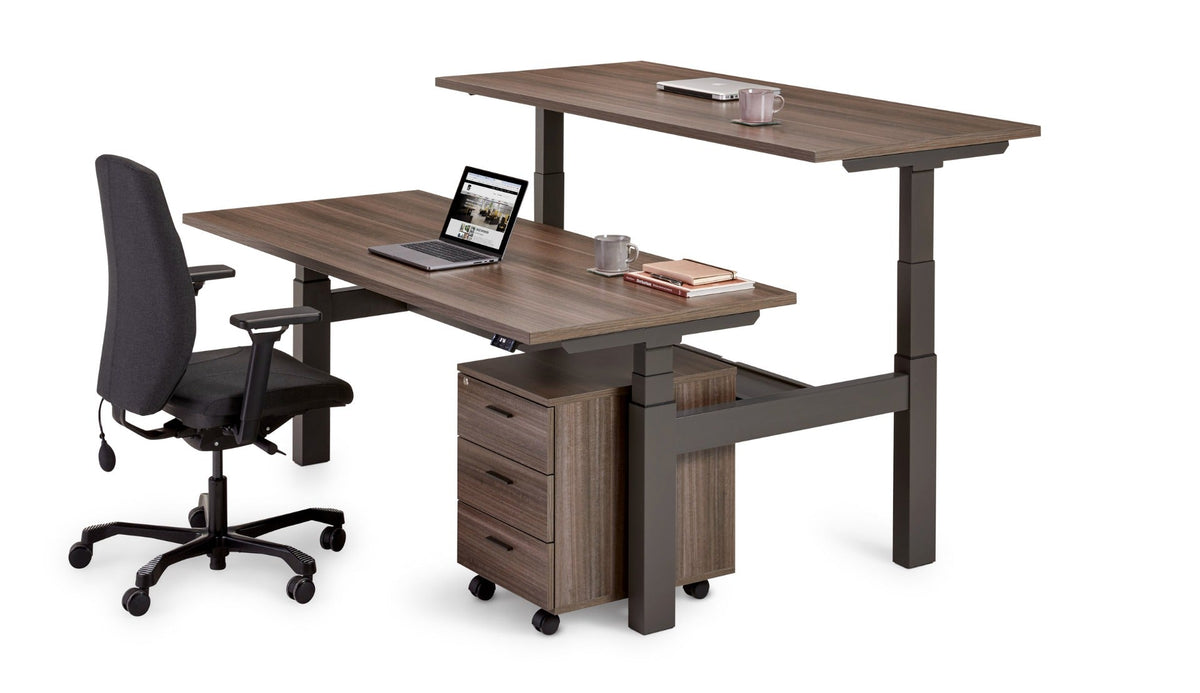
Today this means more than just the right dimensions. The definition has been broadened by the rise of hybrid working. The workstation now has to be adaptive: suitable for different postures, body types and flexible working schedules. The guidance for this is the updated NPR 1813:2025, which looks specifically at the dynamic use of sit-stand desks and the right support during prolonged screen work. An occupational-health-compliant workstation is by definition a dynamic workstation.
NPR 1813 in essence: Furniture must be adjustable for virtually the entire Dutch working population, from the smallest to the largest employee.
Dynamics: combine sit-stand desks with the right chair settings.
The 4 Main Benefits of Office Ergonomics
1) Direct Reduction of Absence Costs
This is the most tangible benefit. By preventing arm, neck and shoulder complaints (KANS) and back complaints, both short-term and long-term sickness absence falls.
From practice: companies that go through a full ergonomic upgrade programme — including training — report noticeably fewer musculoskeletal complaints within the first year.
2) Boost in Focus and Productivity
When you work comfortably and pain-free, your brain is not distracted by physical discomfort.
Active Sitting Posture: An ergonomic office chair invites a more active posture, which supports the circulation. Result: more focus and better cognitive performance.
3) Stronger Employer Branding
In today's 'War for Talent' a healthy workplace is a powerful asset.
Appeal: An ergonomic, modern office shows potential employees that you invest in their well-being. This is crucial for attracting young, highly educated talent.
4) Meeting the Statutory Occupational Health and Safety Requirements
The Dutch Working Conditions Act (Arbowet) requires employers to provide a safe and healthy working environment. Ergonomics is a central part of this.
Statutory Obligation: A healthy, ergonomically furnished workstation is not an option but an obligation. By following the guidelines you reduce legal risks.
Common Mistakes and Misconceptions in Office Ergonomics
"The office chair is the only thing that counts." Incorrect. Monitor height/distance and accessories count just as heavily. An expensive chair sits 'askew' if the screen is too low.
"We have bought sit-stand desks, so we are done." Without user training, desks often stay in one position. The essence is dynamics and alternating.
"One type of chair/desk suits everyone." Ignores body diversity. NPR 1813 exists precisely to make sure that virtually everyone can sit and stand well.
"Working from home is the employee's responsibility." Legally incorrect. The Dutch Working Conditions Act also applies to the home workstation; basic provisions are part of it.
Practical Checklist: Setting Up an Ergonomic Workstation in 6 Steps
You can apply this six-step checklist straight away in your own office (and at home workstations).
The BNR Kantoor Ergonomics Scan
Category
Checkpoint
Standard (NPR/occupational health and safety)
Checklist
I. The Chair (NEN-EN 1335)
Seat height and depth: feet flat on the floor; a fist's width of space behind the hollow of the knee.
Adjustable for body height; correct backrest and seat depth.
Yes / No
Armrests adjustable? Level with the desktop?
Height/width/depth adjustable.
Yes / No
II. The Desk (NPR 1813)
Height & dynamics: sit-stand adjustable (guide value approx. 65–130 cm).
Range suitable for virtually all body heights.
Yes / No
Work surface: room for arms, keyboard and mouse (at least 120 × 80 cm).
No troublesome reflections; comfortable light level.
Yes / No
VI. Behaviour
Change posture regularly: guideline 40 min sitting, 15 min standing, 5 min moving per hour.
Dynamic working day; micro-breaks.
Yes / No
Not every workstation is a desk: a meeting spot also calls for the right dimensions.
Looking Ahead: From Ergonomics to 'Wellbeing as a Service' (2025+)
The future of office interiors revolves around data and personalisation. The focus is on creating a healthy experience.
BNR Kantoor expects that over the coming years we will see a shift from one-off workstation checks to continuous, smart monitoring. This means the breakthrough of:
Smart Furniture: Desks that automatically set the ideal height via an app or wearable and give a notification when you have been sitting too long.
Activity-Based Working 2.0: More walking routes, meeting spots and movement zones.
Sustainability & Health: Circular furniture linked directly to health goals.
This integrated model turns the office into the most productive and healthy place to work.
Time for occupational-health-compliant certainty?
Would you like not just to tick off the ergonomic workstation checklist, but also to outsource implementation and training? Our ergonomics experts help you from inventory to installation. BNR delivers throughout the country; on-site advice, a fast response and installation by our own team are provided within approximately 50 kilometres of Moordrecht.
What are the basic requirements of the Dutch Working Conditions Act for screen work?
The Dutch Working Conditions Act requires screen work to be arranged in such a way that risks to safety and health are excluded as far as possible. This means, among other things, suitable adjustable chairs and tables, sufficient legroom, and a monitor at the correct viewing distance and height.
Is an ergonomic mouse or keyboard compulsory?
Not directly compulsory, but in practice advisable for prolonged screen work. Accessories such as a vertical mouse or compact keyboard reduce wrist and forearm tension and help prevent KANS complaints.
How often should I have my workstation checked for ergonomics?
We advise a periodic ergonomic check and always after a major change (new interior, new occupational health and safety standards, or new employees with specific complaints). An initial check and training on joining are crucial.